Load HubSpot Data into Snowflake
The most reliable way to load HubSpot data into Snowflake is an ELT pipeline that extracts objects through the HubSpot CRM API v3, authenticates with a Private App access token, tracks changes with hs_lastmodifieddate, and lands deduplicated tables in Snowflake. Manual CSV exports and custom scripts work for one-off pulls but break on schema changes, pagination, and API limits.
What is the best way to load HubSpot data into Snowflake?
There are three common approaches. The right one depends on how often the data changes, how many objects you need, and who maintains the pipeline over time.
| Approach | Effort | Cost | Maintenance | Best for |
|---|---|---|---|---|
| Manual CSV export (HubSpot export UI) | Low | Free | High | One-off pulls, small lists, no history |
| Custom code (CRM API + scripts) | High | Engineering time | High | Teams with spare data-engineering capacity |
| ELT platform (DataStori) | Low | Flat $250/mo per app | Low | Recurring, incremental sync of many objects |
Manual exports fall apart once you need incremental updates, deletes, or more than a handful of objects. Custom code gives full control but every HubSpot property change, new custom object, or API version bump becomes a maintenance ticket. An ELT platform trades that ongoing effort for a flat subscription and handles authentication, pagination, incremental logic, and schema changes for you.
How does HubSpot authentication work for data extraction?
HubSpot uses token-based authentication. For a single account pulling its own data on a schedule, the standard choice is a Private App access token: you create a private app in HubSpot Settings, grant it read scopes for the objects you need (for example crm.objects.contacts.read), and use the resulting token as a Bearer token. For an integration that connects to many customers' accounts, use the OAuth 2.0 authorization-code flow instead. Legacy HubSpot API keys were sunset in 2022 and should not be used.
| Auth method | Interactive login? | Best for |
|---|---|---|
| Private App token | No (static Bearer token) | Scheduled sync of a single HubSpot account's own data |
| OAuth 2.0 (Authorization Code) | Yes, once | Apps connecting to many customer accounts with a refresh token |
| API key | No | Deprecated — sunset in 2022, do not use |
Which HubSpot API should you use to extract data?
HubSpot exposes several APIs. For analytics extraction into Snowflake, most objects come from the CRM API v3, which serves records from /crm/v3/objects/{object} in cursor-paginated pages of up to 100 records. When you need to filter by a property — for example only records changed since the last run — the CRM Search API accepts filter groups on any property. The Batch API reads up to 100 records by ID in a single call for high-throughput backfills.
| API | Model | Use it for |
|---|---|---|
| CRM API v3 (list) | Cursor pagination, 100/page | Full and incremental sync of standard and custom objects |
| CRM Search API | Property filters, 100/page | Incremental pulls filtered on a modified-date property |
| Batch API | Up to 100 records by ID per call | High-throughput backfills and lookups |
Two details matter for a correct pipeline. For incremental sync, filter on hs_lastmodifieddate (which HubSpot updates on every property change) so each run only pulls new and changed records. For deletes, records are archived rather than hard-deleted — pass archived=true to the list endpoint to capture archived records instead of letting them silently disappear from your warehouse.
How to load HubSpot data into Snowflake with DataStori
DataStori is an agentic ELT platform: you describe the pipeline in plain language and its agents identify the objects, generate the pipeline, and configure incremental sync. You point DataStori at your Snowflake account once as the destination; pipelines then run inside your own cloud, so HubSpot data moves from HubSpot to your Snowflake without passing through DataStori's servers. The full flow takes minutes, not days.
- Describe what you need. Open the AI Pipeline Builder, pick HubSpot, and describe your goal in plain language — a business goal, or the data itself, for example
list contacts:ingest HubSpot contacts to Snowflake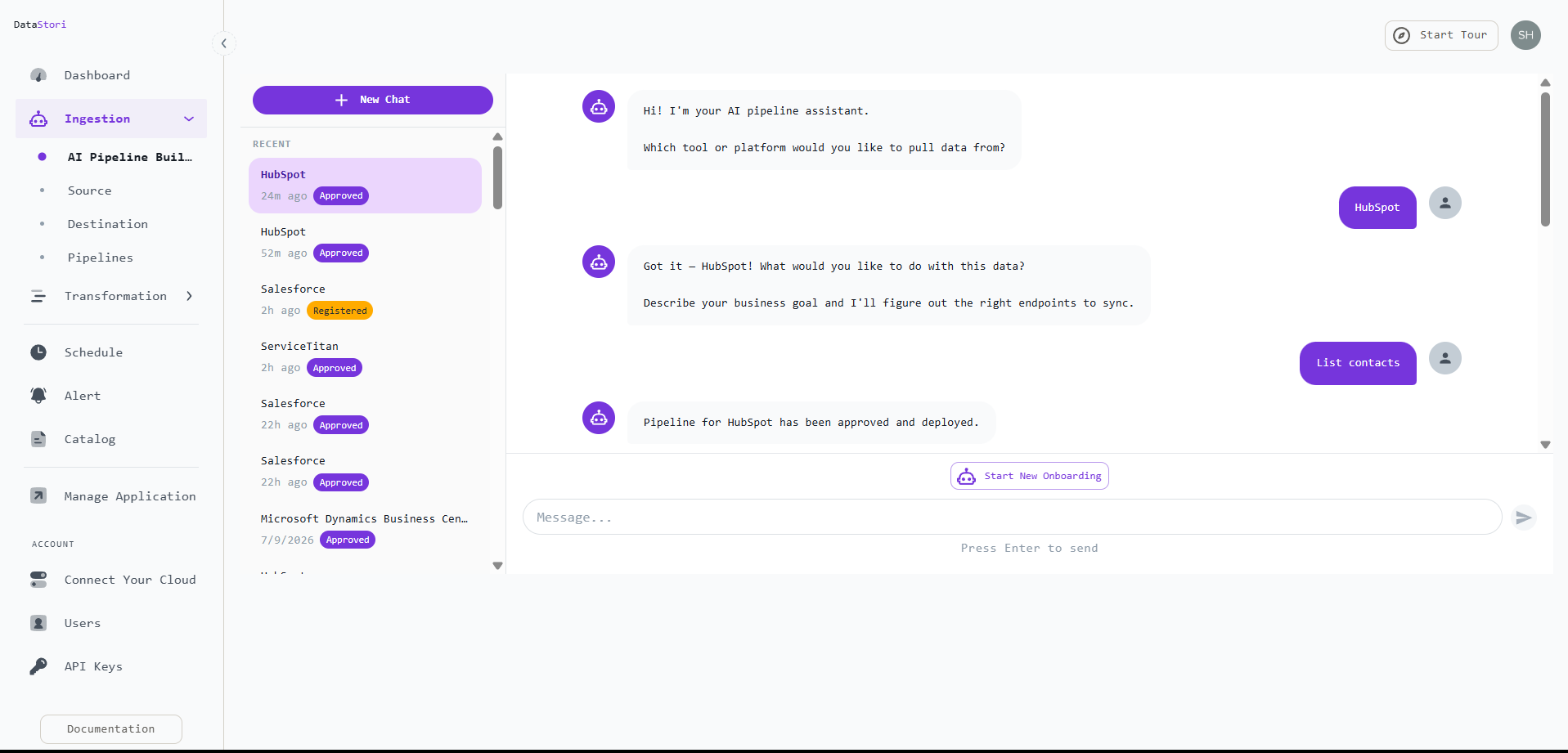
Pick HubSpot and describe what you want in plain language. - Let the agent discover the API. DataStori fetches the live HubSpot API documentation and proposes the relevant CRM endpoints (here
GET /crm/v3/objects/contacts) with a confidence score — no manual API mapping.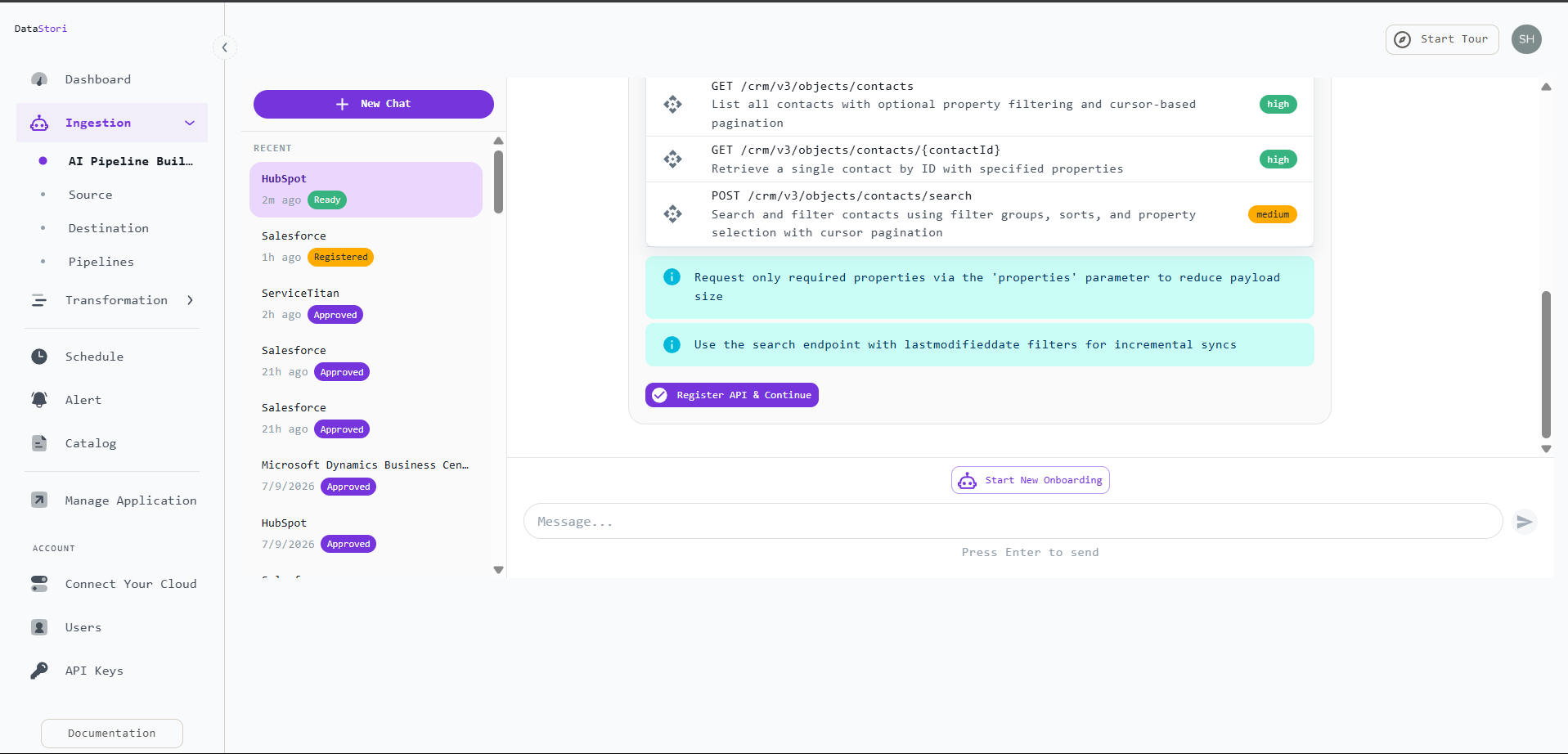
The agent discovers HubSpot CRM endpoints from the live API docs. - Connect HubSpot. Authorize with a Private App access token — DataStori auto-detects the Bearer auth scheme — and test the connection. OAuth 2.0, API Key, and Basic Authentication are also supported.
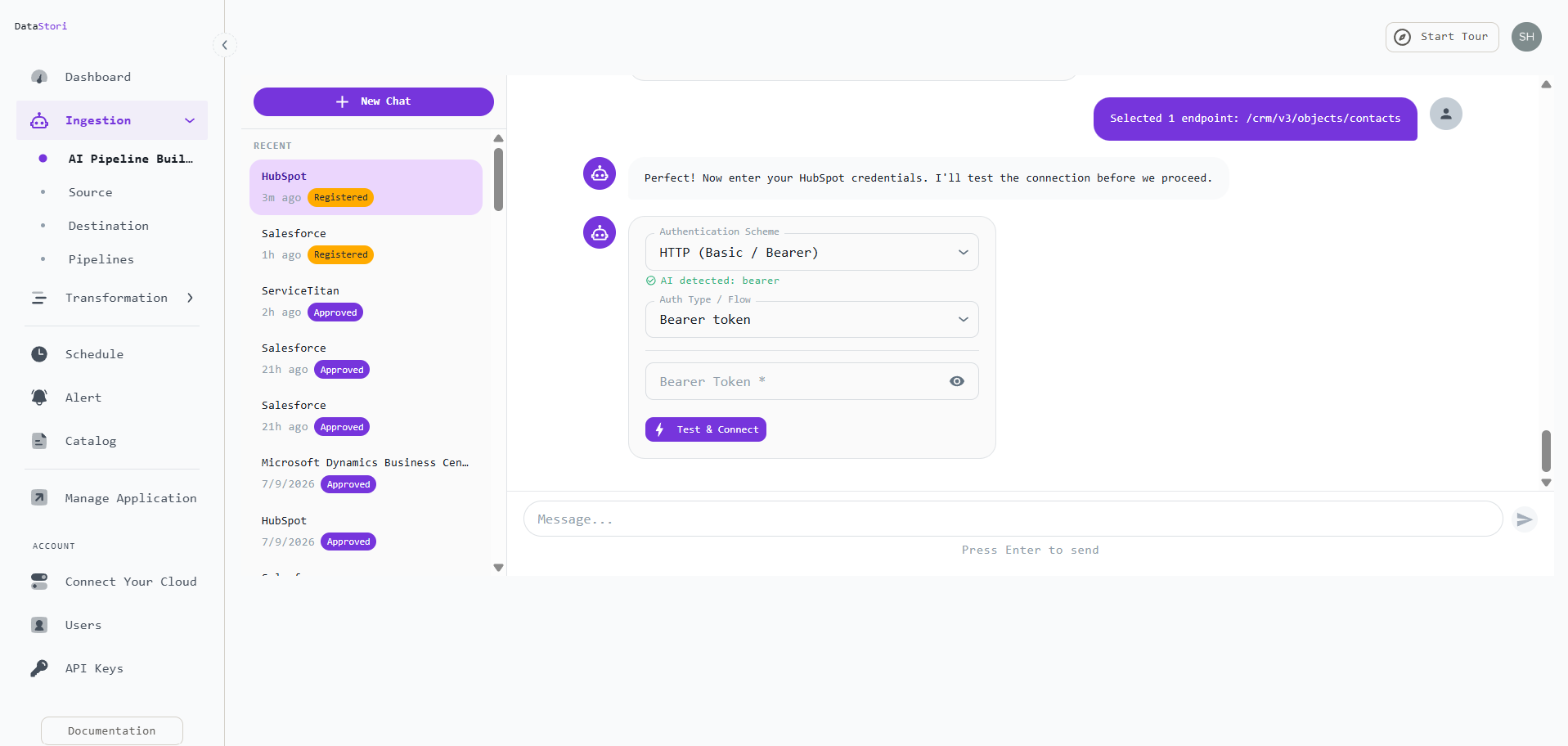
Connect HubSpot with a Private App Bearer token and test it. - Review and create the pipeline. Confirm the auth, pagination (HubSpot uses cursor pagination), API host, and rate limits the agent detected, then create the pipeline. The schema is documented automatically.
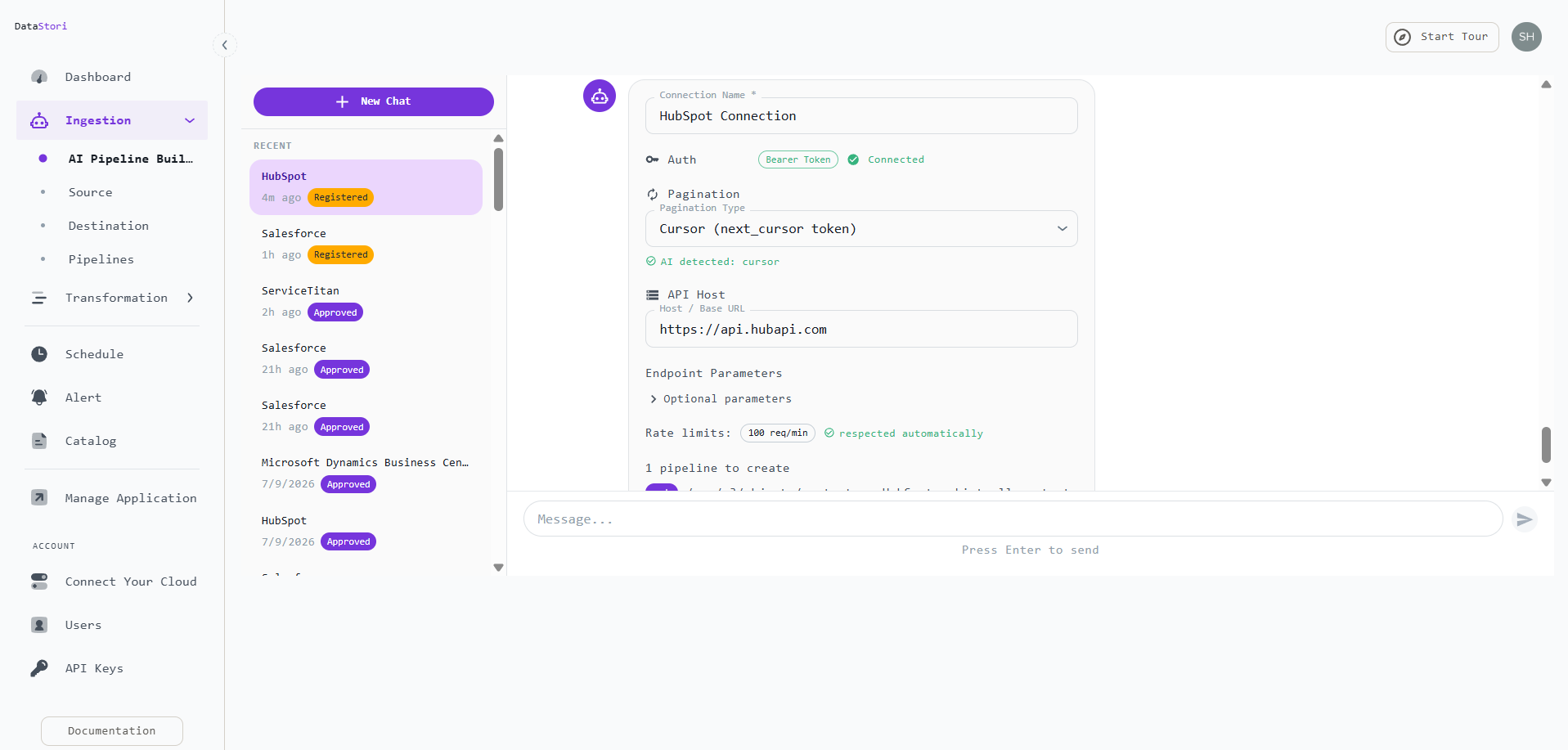
Review the detected auth, cursor pagination, host, and rate limits. 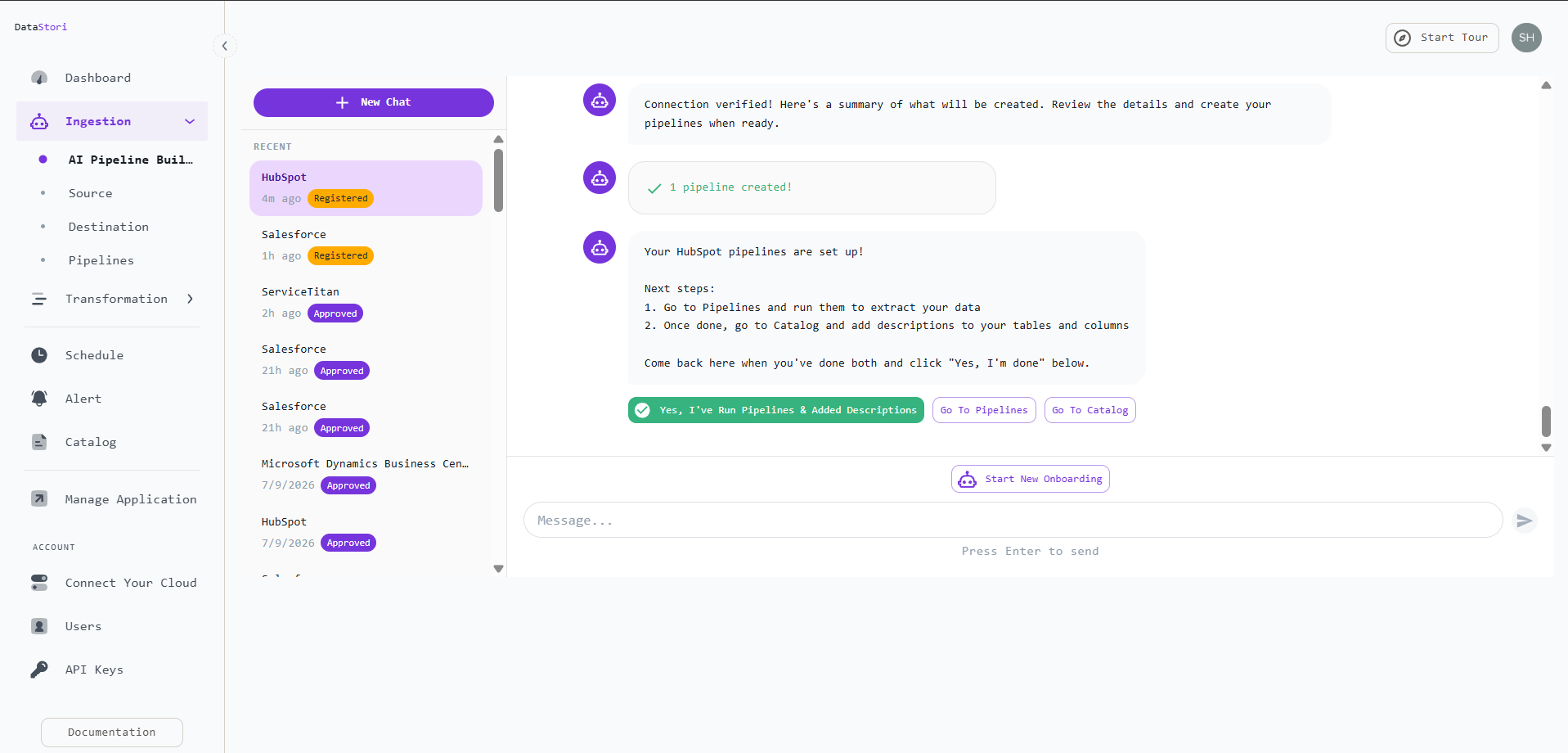
The pipeline is created and ready to run. - Run and schedule. Trigger a run or put it on a schedule. Extraction, deduplication on the record ID, and incremental tracking on
hs_lastmodifieddateall happen automatically — with schema evolution and data-quality checks (freshness, primary-key not-null, uniqueness) on every run.
The run completes and reports its status on the dashboard. - Query the data in Snowflake. Deduplicated HubSpot records land in your Snowflake table (
LISTCONTACTS), with nested HubSpot properties flattened toPROPERTIES_*columns — ready for reporting and BI.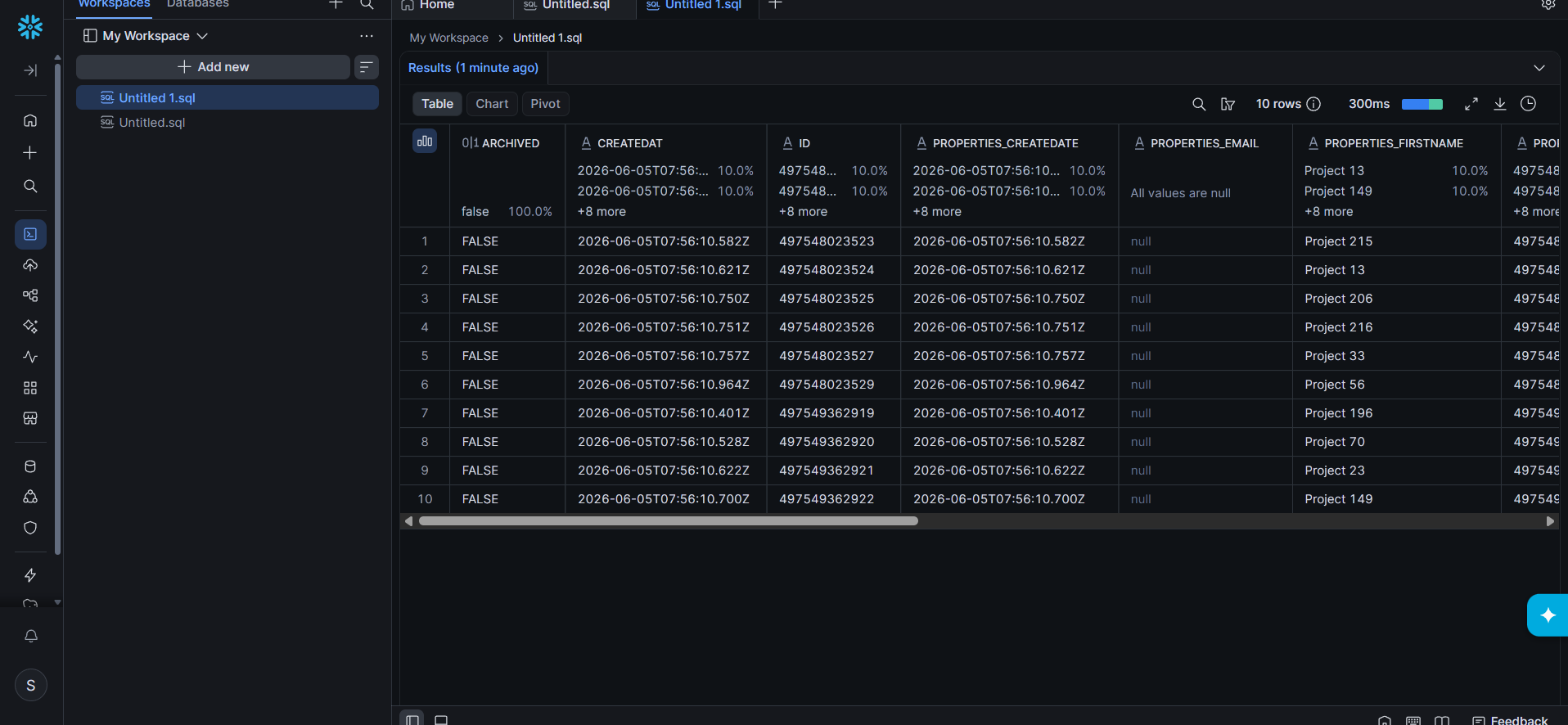
HubSpot contacts loaded into Snowflake, properties flattened to columns.
Data lands in your choice of format: Delta (default), Iceberg, Parquet, or CSV. Because pipelines execute in your cloud, your data never leaves your environment and DataStori only ever sees pipeline metadata.
Transforming HubSpot contact data after it lands
Loading contacts is usually the first step, not the last. DataStori's Transformation Workspace reads the same object catalog used during ingestion and writes PySpark scripts on request, so you can turn a plain-English question — such as how fast your contact list is growing — into a scheduled, versioned transformation without writing Spark by hand.
- Describe the transformation. Open the Transformation Workspace and describe what you want computed. For example: count new contacts created per month, with a running cumulative total. The assistant reads your data catalog automatically to find the contacts table, then generates a complete PySpark script that reads from the HubSpot contacts silver table and writes to the gold layer as both Delta and CSV.
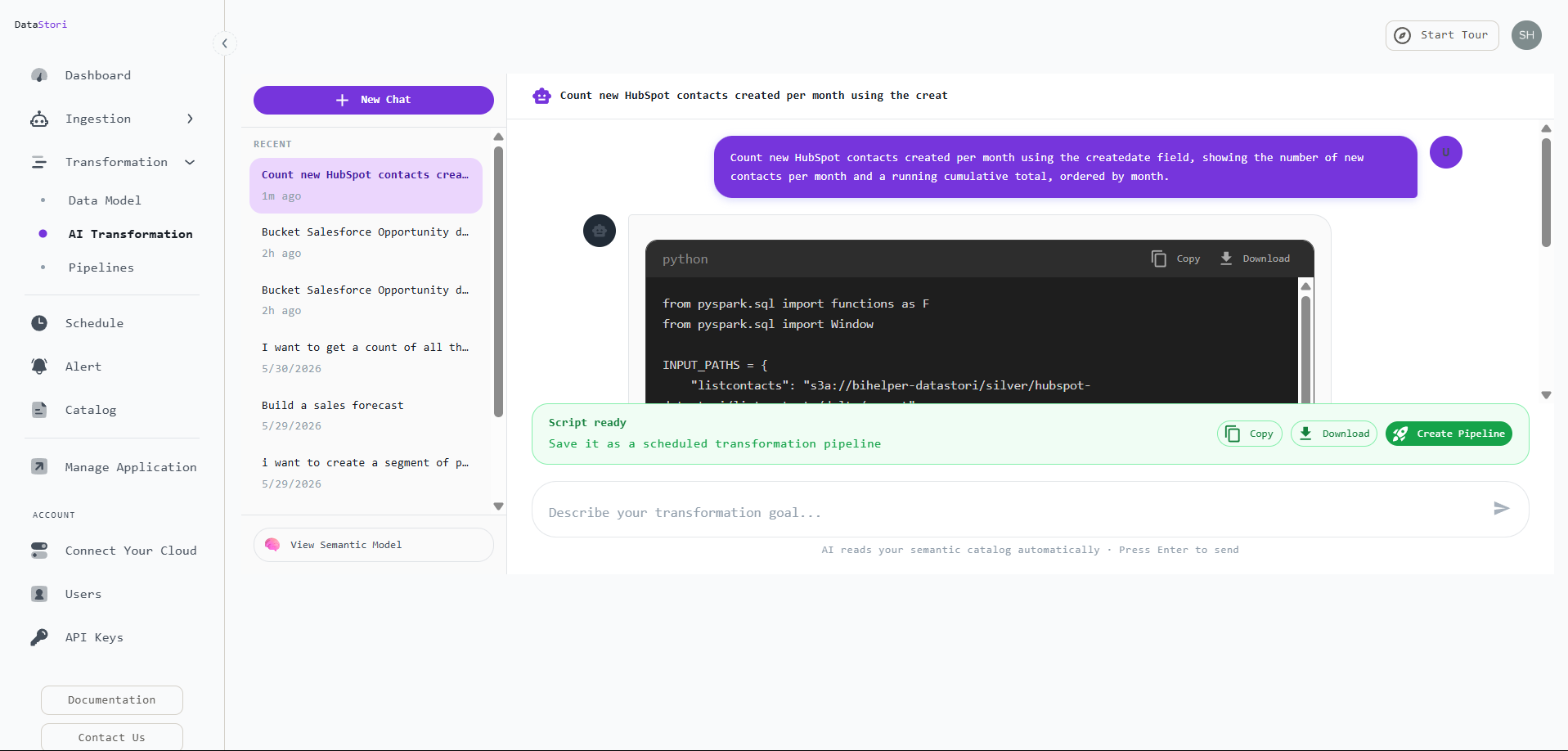
Describe the transformation; the assistant generates the PySpark script. - Create and run the pipeline. Name the transformation and save it. DataStori stores the script as a versioned artifact, registers it as a schedulable pipeline in the Transformation Catalog, and lets you trigger a run on demand.
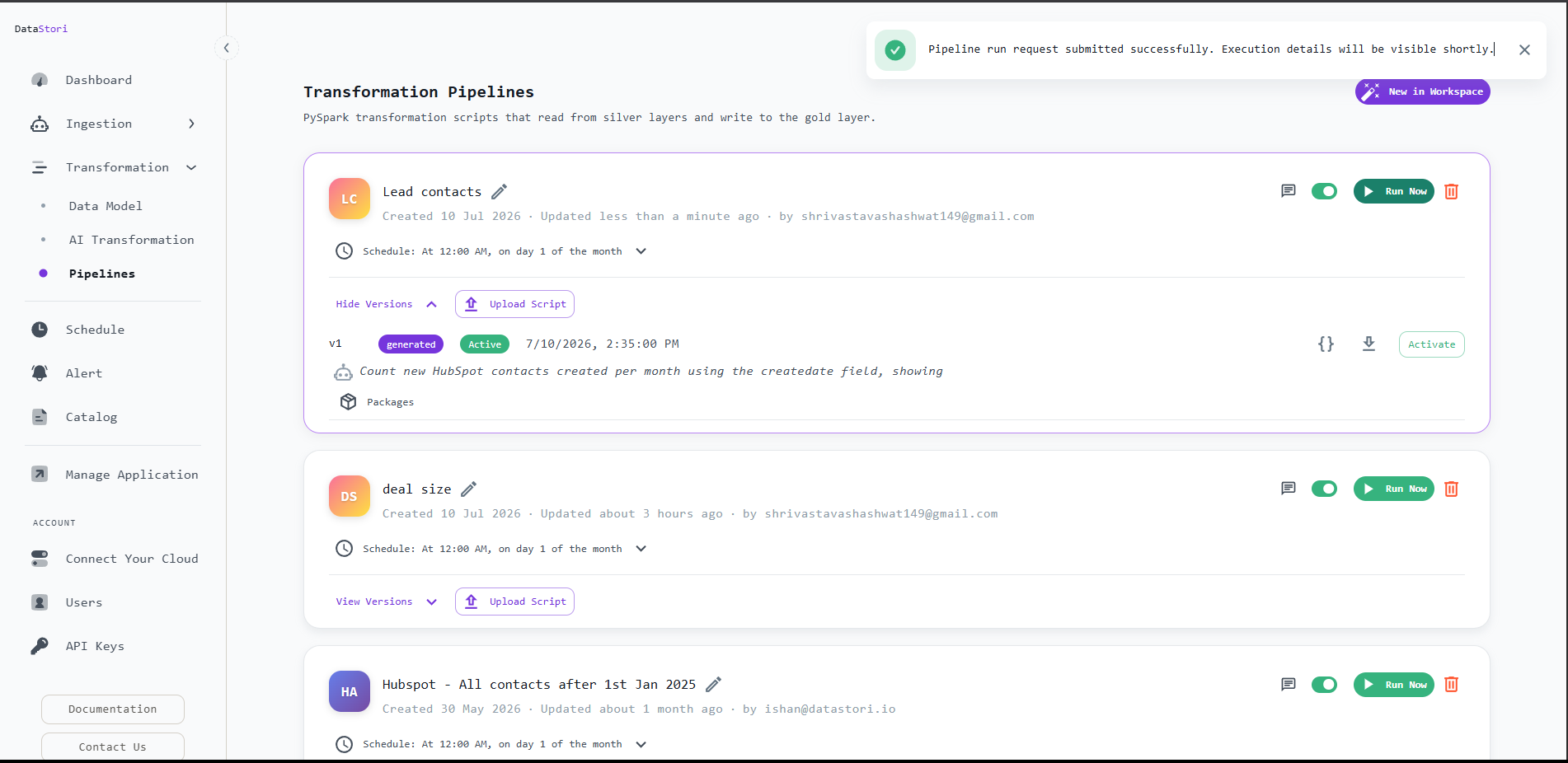
The transformation is registered and ready to run on its own schedule. 
The transformation run completes alongside ingestion runs. - Find the output in your own storage. Because transformations run in your cloud like everything else in DataStori, the result lands in the gold layer of your own S3 bucket, next to the HubSpot silver data it read from.
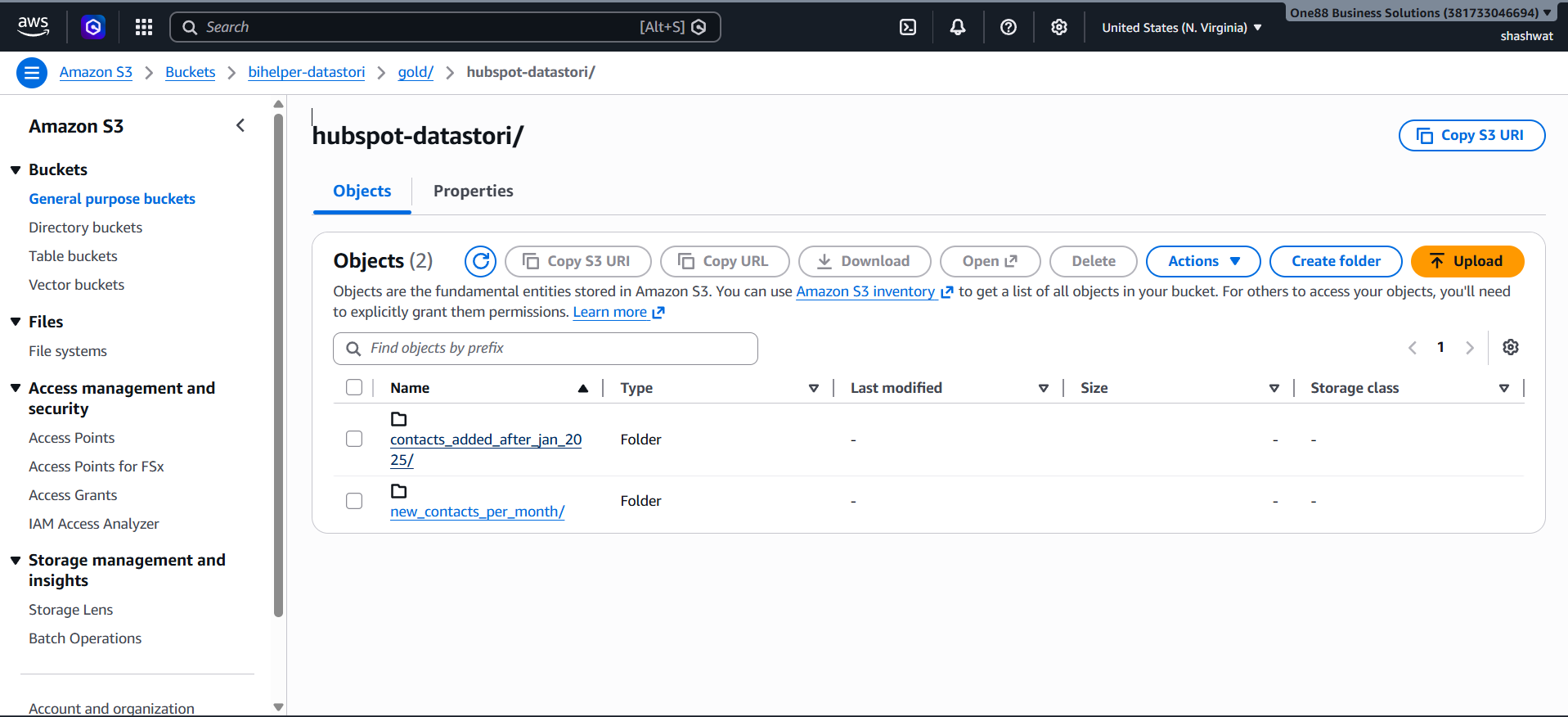
The transformation writes its output to the gold layer of your own S3 bucket. - Open the result. The CSV output is a plain file — open it directly to see new contacts per month and the running cumulative total, with no need to query Snowflake or Spark to check the numbers. The cumulative total reaching 352 matches the full contact count loaded during ingestion.

New contacts per month with a running cumulative total, ending at 352.
How much does it cost to load HubSpot into Snowflake?
DataStori is a flat $250 per month per application, with unlimited pipelines and unlimited data volume. HubSpot counts as one application no matter how many objects you sync, so costs do not grow with record counts the way metered ELT tools do. You pay Snowflake and your cloud provider directly for storage and compute. A 14-day free trial is available.
Frequently Asked Questions
Does DataStori support HubSpot custom objects and properties?
Yes. DataStori auto-discovers objects and properties from your HubSpot account, including custom objects and custom properties. You do not need a pre-built connector for each object.
How are HubSpot updates and deletes handled in Snowflake?
Incremental runs filter on hs_lastmodifieddate to capture new and changed records, and can pass archived=true to capture archived (deleted) records. DataStori deduplicates on the HubSpot record ID so your Snowflake tables reflect the current state without duplicates.
Does my HubSpot data pass through DataStori's servers?
No. Pipelines run entirely in your own cloud. HubSpot data moves directly to your Snowflake destination. DataStori orchestrates the pipeline and can only access metadata, never the business data itself.
Can DataStori handle HubSpot API rate limits and large volumes?
Yes. DataStori paginates through the CRM API within HubSpot's per-app rate limits, retries on transient errors, and can filter incrementally so each run only pulls changed records. It has been tested on tables up to 100 GB and 30 million rows.
What Snowflake data formats does DataStori deliver?
Data lands in Delta (the default), Iceberg, Parquet, or CSV, in your own cloud storage and Snowflake. Data volume is unlimited on every plan.